08 · ライダー
Lidar
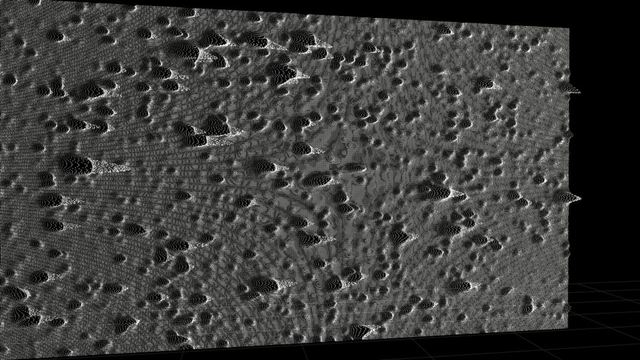
AI depth turns your shot into a point cloud. Scans, contours, wireframes, voxels, chrome, camera moves.
Looks16 Controls82 Reads other framesNo OFX idcom.prismorafx.lidar
Looks
16 presets · click one to preview it aboveControls
Every control, grouped as in Resolve's inspectorMain15
| Control | Default | Range / options | What it does |
|---|---|---|---|
| Intensitymenu | Standard | Light, Standard, Heavy | |
| Qualitymenu | Balanced | Best (final render), Balanced, Fast | Depth detail and point count. Depth is cached per frame. |
| Reveal (real shot -> 3D)slider | 1 | 0 - 1 | |
| Breatheslider | 0 | 0 - 1 | Slow swell of depth. |
| Apply Tomenu | All | All, Subject, Background | |
| Subject Thresholdslider | 0.55 | 0.05 - 0.95 | |
| Backgroundmenu | Colour | Colour, Original Footage, Black | |
| Background Rslider | 0 | 0 - 1 | |
| Background Gslider | 0 | 0 - 1 | |
| Background Bslider | 0 | 0 - 1 | |
| Random Seedinteger | 0 | 0 - 999 | |
| Glowslider | 0.3 | 0 - 2 | |
| Glow Sizeslider | 10 | 1 - 40 | |
| Show Depth Mapcheckbox | off | White = near, black = far. | |
| Mix With Originalslider | 1 | 0 - 1 |
Depth6
| Control | Default | Range / options | What it does |
|---|---|---|---|
| Depth Frommenu | AI Depth | AI Depth, Luma (bright = near), Luma (dark = near) | |
| Depthslider | 1.5 | 0 - 4 | 0 = flat sheet. |
| Depth Curveslider | 1 | 0.3 - 3 | |
| Depth Smoothingslider | 0.4 | 0 - 2 | |
| Edge Cutslider | 0.6 | 0 - 1 | Removes points bridging a depth jump. |
| Invert Depthcheckbox | off |
Camera12
| Control | Default | Range / options | What it does |
|---|---|---|---|
| Camera Movemenu | Drift | Static, Orbit, Push, Drift, Dolly Zoom, Fly Through | |
| Move Amountslider | 1 | -2 - 2 | |
| Move Time (s)slider | 12 | 1 - 60 | |
| Yaw (°)slider | 0 | -90 - 90 | |
| Pitch (°)slider | 0 | -60 - 60 | |
| Roll (°)slider | 0 | -180 - 180 | |
| Roll Speed (°/s)slider | 0 | -90 - 90 | |
| Distanceslider | 0.3 | -0.6 - 3 | |
| Field of View (±°)slider | 0 | -30 - 50 | Wide exaggerates depth, long flattens it. |
| Orbit Centre Xslider | 0.5 | 0 - 1 | |
| Orbit Centre Yslider | 0.5 | 0 - 1 | |
| Orbit Depthslider | 1 | 0 - 2 |
Points27
| Control | Default | Range / options | What it does |
|---|---|---|---|
| Stylemenu | Soft Dot | Hard Dot, Soft Dot, Square, Streak, Linked Dots, Row Lines, Contour, Mesh, Wireframe, Voxel, Chrome, Crosses, Sparkle | |
| Densityslider | 0.2 | 0.02 - 0.5 | |
| Point Size (px)slider | 3 | 0.5 - 12 | |
| Size Variationslider | 0 | 0 - 1 | |
| Size by Depthslider | 0.6 | 0 - 1 | |
| Opacityslider | 0.75 | 0 - 2 | |
| Flying Pixelsslider | 0.3 | 0 - 1 | Faint streaks from the edges of near things toward the background. |
| Scan Bandsmenu | Off | Off, Rows, Depth | |
| Band Countslider | 40 | 2 - 300 | |
| Band Widthslider | 0.3 | 0.02 - 1 | |
| Scan Speedslider | 0.4 | -4 - 4 | |
| Light Angle (°)slider | -135 | -180 - 180 | |
| Linesinteger | 160 | 10 - 500 | |
| Line Width (px)slider | 1 | 0.5 - 6 | |
| Luma Heightslider | 0 | 0 - 2 | Lifts lines where the picture is bright. |
| Sync Wobbleslider | 0 | 0 - 2 | |
| Hide Hidden Linescheckbox | on | ||
| Contour Spacingslider | 0.04 | 0.005 - 0.2 | |
| Index Line Everyinteger | 5 | 0 - 20 | |
| Image Under Linesslider | 0 | 0 - 1 | |
| Mesh Detail (px)slider | 4 | 1 - 12 | |
| Voxels Acrossinteger | 96 | 8 - 400 | |
| Voxel Gapslider | 0.12 | 0 - 0.8 | |
| Extrudecheckbox | on | ||
| Surface Lightslider | 0.6 | 0 - 1 | Lights the points by the shape of the depth surface, like a plaster cast. |
| Highlight Rolloffslider | 0.6 | 0 - 2 | |
| Rim Lightslider | 0.3 | 0 - 2 |
Colour19
| Control | Default | Range / options | What it does |
|---|---|---|---|
| Colourmenu | Source | Solid, Source, Gradient Map | |
| Map Bymenu | Luma | Luma, Nearness, Heat | |
| Colours In Mapinteger | 3 | 2 - 5 | |
| Map Colour 1 Rslider | 0.02 | 0 - 1 | |
| Map Colour 1 Gslider | 0.02 | 0 - 1 | |
| Map Colour 1 Bslider | 0.04 | 0 - 1 | |
| Map Colour 2 Rslider | 0.3 | 0 - 1 | |
| Map Colour 2 Gslider | 0.55 | 0 - 1 | |
| Map Colour 2 Bslider | 0.9 | 0 - 1 | |
| Map Colour 3 Rslider | 0.95 | 0 - 1 | |
| Map Colour 3 Gslider | 0.95 | 0 - 1 | |
| Map Colour 3 Bslider | 0.95 | 0 - 1 | |
| Map Colour 4 Rslider | 1 | 0 - 1 | |
| Map Colour 4 Gslider | 0.6 | 0 - 1 | |
| Map Colour 4 Bslider | 0.2 | 0 - 1 | |
| Map Colour 5 Rslider | 1 | 0 - 1 | |
| Map Colour 5 Gslider | 1 | 0 - 1 | |
| Map Colour 5 Bslider | 0.8 | 0 - 1 | |
| Saturationslider | 1 | 0 - 2 |
Scatter3
| Control | Default | Range / options | What it does |
|---|---|---|---|
| Blow Awayslider | 0 | 0 - 1 | Keyframe 0 -> 1 to scatter the picture, 1 -> 0 to assemble it. |
| Scatter Withmenu | Wind | Wind, Swirl, Gravity, Assemble | |
| Floor Gridslider | 0 | 0 - 1 |
Tips
- The AI depth model (~100 MB) downloads once at install and runs on your computer.
- Depth is computed once per frame and cached, so the second playback is fast.
- Put PRISMORA after your colour space transform, on Rec.709 footage.
- Quality "Auto" renders at half resolution while playing in the viewer and full resolution on Deliver.
Included in the licence
$99
All 9 effects · 4 computers · one-time